

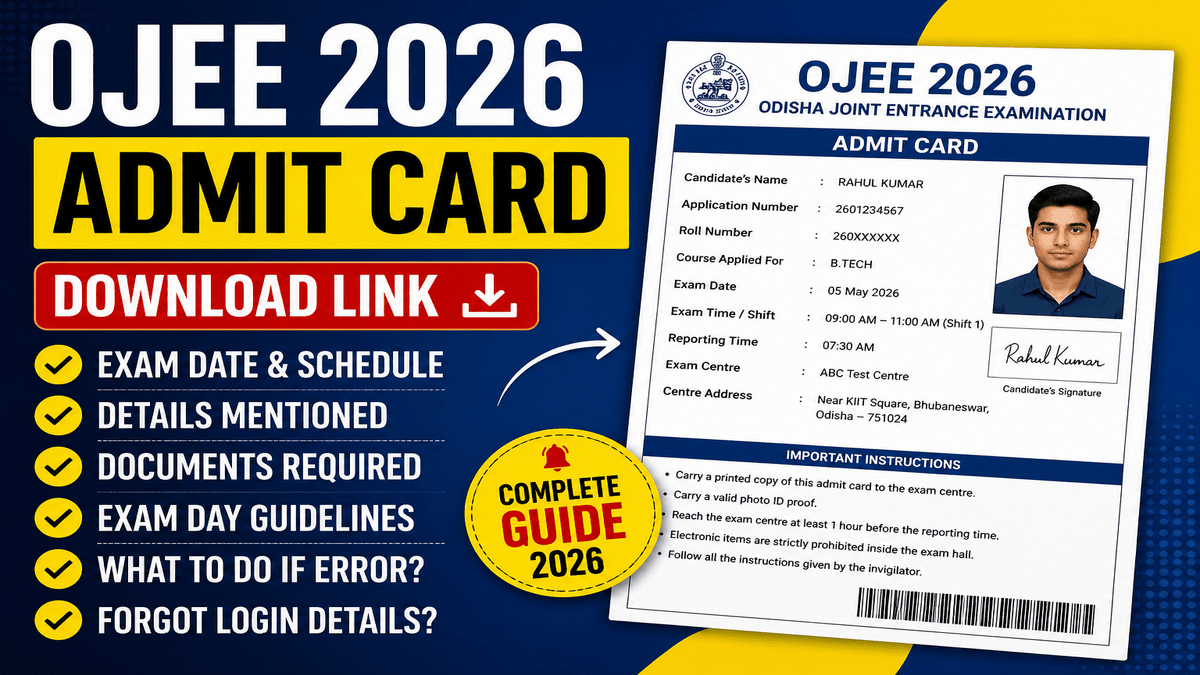
For candidates who applied for the Odisha Joint Entrance Examination, an official announcement has been made regarding the release of admit cards on April 25, 2026. Please note that the examination dates have been scheduled from May 4 to May 10, 2026, and the exams will be conducted across multiple shifts.
Furthermore, the examination will be computer-based, and candidates can download their admit cards via the online portal. The portal provides a wealth of information—ranging from the exam pattern to various other details—that will prove highly beneficial throughout your preparation journey.
Additionally, specific details regarding your assigned shift and the exact timing of your examination will be clearly displayed on your admit card. Therefore, you will be able to download your admit card starting today, once the link becomes active.
OJEE Admit Card 2026 overview
| Particulars | Details |
|---|---|
| Exam Name | Odisha Joint Entrance Examination (OJEE 2026) |
| Conducting Body | Odisha Joint Entrance Examination Board (OJEEB) |
| Exam Level | State Level Entrance Exam |
| Courses Offered | B.Tech (Lateral), MBA, MCA, M.Tech, B.Pharm, etc. |
| Admit Card Release Date | 25 April 2026 (Expected/Official Update) |
| Exam Dates | 4 May to 10 May 2026 |
| Mode of Exam | Computer-Based Test (CBT) |
| Admit Card Mode | Online |
| Login Credentials Required | Application Number & Date of Birth |
| Official Website | https://ojee.nic.in |
| Admit Card Availability | Till Exam Day |
| Mandatory Documents | Admit Card + Valid Photo ID Proof |
| Exam Cities | Across multiple cities in India (30+ cities) |
OJEE Admit Card 2026 Release Date
- Admit Card Release Date: 25 April 2026
- Mode of Release: Online
- Official Website: https://ojee.nic.in
- Login Credentials: Application Number & Date of Birth
- Availability: Till Exam Day
- Exam Start Date: 4 May 2026
- Exam End Date: 10 May 2026
Up homeguard admit card exam city direct link, exam pattern & selection process
OJEE 2026 Exam Date & timing schedule
| Exam Date | Shift | Timing | Details |
|---|---|---|---|
| 4 May 2026 | Shift 1 & Shift 2 | Course-wise (Admit Card mein diya hoga) | CBT Mode (Online) |
| 5 May 2026 | Shift 1 & Shift 2 | Course-wise (Admit Card mein diya hoga) | Multiple Courses |
| 7 May 2026 | Shift 1 & Shift 2 | Course-wise | Different Streams Exams |
| 8 May 2026 | Shift 1 & Shift 2 | Course-wise | Various PG & UG Courses |
| 9 May 2026 | Shift 1 & Shift 2 | Course-wise | Final Day Exams |
How to Download OJEE Admit Card 2026
- To download the admit card, you must first visit the official website.
- After that, to access the admit card, you will first need to log in.
- Once you have logged in, click on the Admit Card option.
- A new page will now open before you.
- Here, after filling in a few details, you will be able to view your admit card in PDF format.
- Which you can easily print.
- And do not forget to verify all the information against your documents.
Direct Link to Download OJEE Admit Card 2026
- Official Website: https://ojee.nic.in
- Admit Card Login Page: Click Here to Download Admit Card
- Admit Card Link Status: Active from 25 April 2026
- Login Required: Application Number & Date of Birth
- Note: Admit card download link homepage par “OJEE Admit Card 2026” ke naam se available hota hai
Details Mentioned on OJEE Admit Card
- Candidate’s Name
- Roll Number
- Application Number
- Photograph of the Candidate
- Signature of the Candidate
- Exam Date
- Exam Timing (Shift & Slot)
- Reporting Time
- Exam Centre Name
- Exam Centre Address
- Course / Stream Applied For
- Gender
- Category
- Important Instructions for Exam Day
- Exam Authority Details
Documents Required with Admit Card
- OJEE Admit Card 2026 (Printed Copy)
- Valid Photo ID Proof (Aadhaar Card / Voter ID / PAN Card / Driving License / Passport)
- Passport Size Photograph (same as application form)
- PwD Certificate (if applicable)
- Any other document mentioned on admit card
OJEE Exam Pattern 2026
| Particulars | Details |
|---|---|
| Mode of Exam | Computer-Based Test (CBT) |
| Type of Questions | Multiple Choice Questions (MCQs) |
| Medium of Exam | English |
| Exam Duration | 2 Hours (MBA, MCA, B.Tech LE, M.Tech, etc.) 1 Hour (Some courses like Integrated MBA, M.Pharm) Up to 3 Hours (B.Pharm – depending on paper) |
| Total Questions | Course-wise different (generally around 60–120 questions) |
| Marking Scheme | +4 marks for each correct answer |
| Negative Marking | -1 mark for each wrong answer |
| Unattempted Questions | No marks deducted |
OJEE Exam Day Guidelines
- Reach the exam center at least 1 hour before the reporting time
- Carry a printed copy of the OJEE Admit Card
- Bring a valid photo ID proof (Aadhaar Card / PAN Card / Voter ID / Driving License / Passport)
- Carefully read and follow all instructions mentioned on the admit card
- Verify your seat number and exam hall details after entry
- Electronic devices such as mobile phones, smartwatches, calculators, or Bluetooth devices are strictly prohibited
- Carry only allowed items inside the exam hall
- Rough sheets will be provided at the exam center
- Do not indulge in any unfair means or malpractice during the exam
- Follow all instructions given by the invigilator
- Leaving the exam hall before the completion of the exam is not allowed
- Wear simple and comfortable clothing (avoid heavy accessories)
- Follow any health or safety guidelines if applicable
What to Do If Admit Card Has Error
- Carefully check all details on the admit card after downloading
- If you find any mistake, do not ignore it
- Immediately contact the OJEE authorities/helpdesk
- Use the official website (ojee.nic.in) for contact details
- Provide your Application Number and correct details while reporting the issue
- Keep supporting documents ready (ID proof, application form, etc.)
- Request for correction or reissue of the admit card
- Follow the instructions given by the exam authority
- Do not wait until the last day—report the error as early as possible
- After correction, download the updated admit card again
Forgot Login Details? (Recovery Process)
- Visit the official website: ojee.nic.in
- Click on the “Forgot Password” or “Forgot Application Number” link
- Enter required details such as registered email ID / mobile number / date of birth
- Follow the on-screen instructions to verify your identity (OTP or security question)
- Reset your password or retrieve your application number
- Check your registered email/SMS for login details
- Use the recovered credentials to log in again
- Download your OJEE Admit Card 2026
Once you have downloaded your admit card, carefully review all the details and cross-verify them against your personal documents. Should you encounter any discrepancies or issues, please visit the 'Contact Us' section on the official website to get in touch with the authorities; this will enable you to rectify the errors, as you may be denied entry to the examination hall if any problems remain unresolved.
Comments ( 0)
Leave a Comment
No comments yet. Be the first to comment!